

A warm welcome to Singapore Management University!
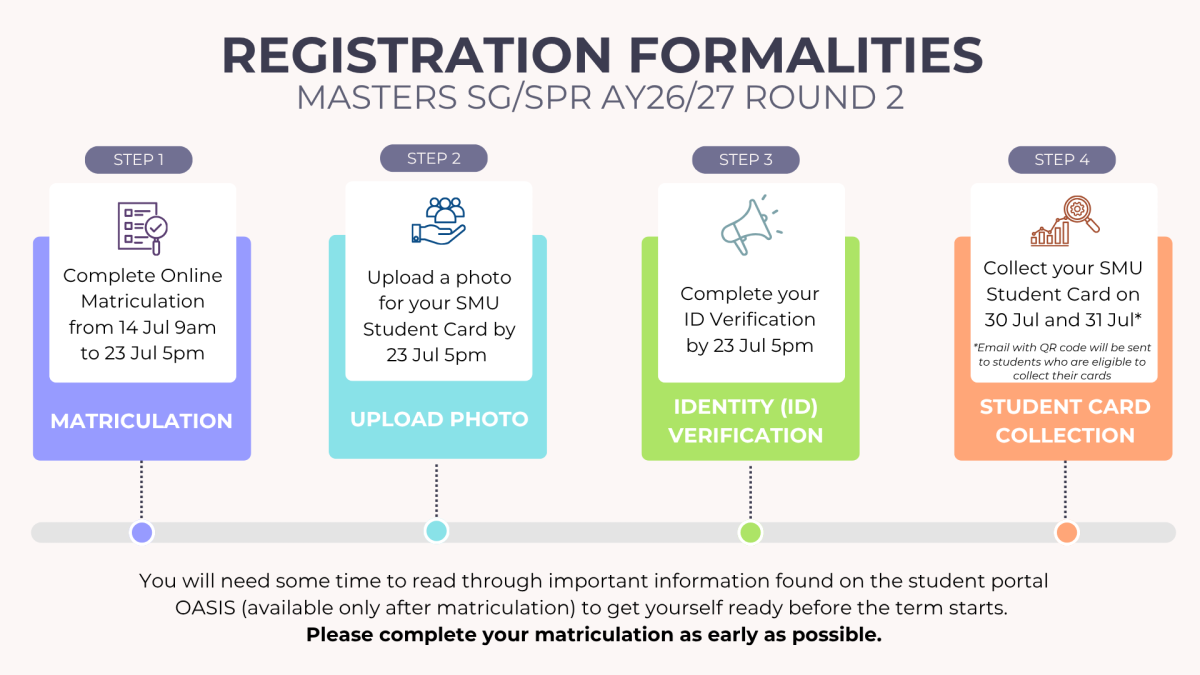
All successful applicants who have accepted SMU's offer are required to register as students of the University before commencing their studies in August 2026. Please take note of the important Matriculation deadlines for AY2026/2027 August intake and complete the registration formalities according to the deadlines provided. For more information, please refer to the respective section.
NOTE:
- This matriculation exercise is only applicable to students who are commencing their studies in August 2026.
- Applicants who have just accepted the offer would need to allow 3 working days before proceeding to perform online matriculation.
A warm welcome to Singapore Management University!
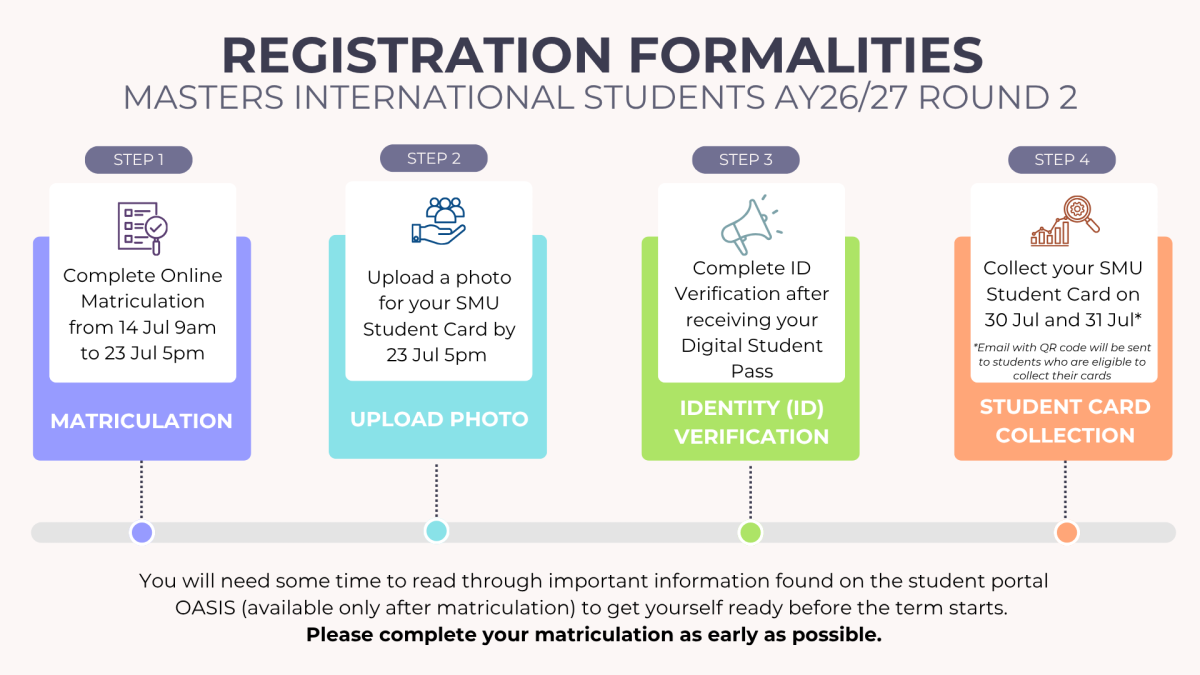
All successful applicants who have accepted SMU's offer are required to register as students of the University before commencing their studies in August 2026. Please take note of the important Matriculation deadlines for AY2026/2027 August intake and complete the registration formalities according to the deadlines provided. For more information, please refer to the respective section.
NOTE:
- This matriculation exercise is only applicable to students who are commencing their studies in August 2026.
- Applicants who have just accepted the offer would need to allow 3 working days before proceeding to perform online matriculation.
Matriculated NSMen
NSMen who have previously completed the following registration formalities are official SMU students.
- Online Matriculation
- Online ID Verification
- SMU Student Card Collection
If you have not completed the registration formalities, please take note of the key deadlines:
|
1 June 2023, 9.00am — 28 June 2023, 5.00pm |
Online Identity Verification |
| By 28 June 2023, 5.00pm | Photograph Submission |
| 24 July 2023 — 27 July 2023 | SMU Student Card Collection |
| 14 August 2023 | Start date of Term 1 AY23/24 |
During Matriculation
You are expected to do the following steps via the Applicant's Self Service portal.
✅ Note: Certain steps require you to fulfil pre-requisites before proceeding, please ensure that you complete the necessary pre-requisite before you embark on that step.
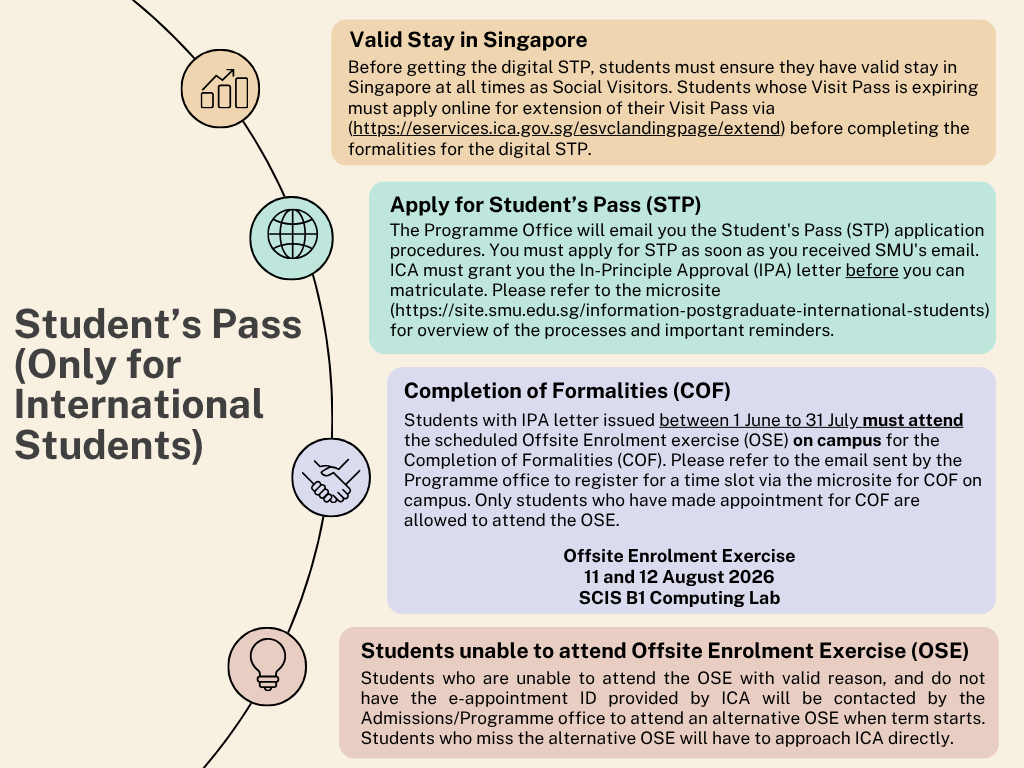
Kindly refer to the microsite for important processes including instructions on Student's Pass Application (STP) and to register for Completion of Formalities (COF) as part of your documentation requirements on campus.
Should you have any enquiry on Student's pass matters, please contact your Programme Office/Manager.
Navigation Path: Self-Service » Online Matriculation » Make Online Payment
Make one-time non-refundable admissions-related fees (i.e. Application Fee/Optional Fee/Programme Fee Deposit/Registration Fee) via online payment. Debit and credit cards issued by MasterCard and Visa are accepted. Kindly allow 2 working days for payment to be updated in the system e.g. If you wish to matriculate on 23 June 2026, you will need to pay the admissions-related fees by 18 June 2026.
You may check the payment status via Applicant's Self-Service (Student Admission or Online Matriculation > View Payment Status).
Please confirm your personal data as per your official identity documents. Personal data includes your official name, passport details, NRIC details and emergency contacts.
If you need to update your personal data due to inaccuracies or new identity documents and you have not matriculated online, please email your respective SMU Graduate Programme Office. You will need to provide your latest official documents in the email to your respective SMU Graduate Programme Office for verification and update of your record.
It is important for the University to maintain accurate personal data of students in case of emergencies.
Navigation Path: Self-Service » Online Matriculation » Receiving Bank Account Mandatory
(This step is not applicable to IPM/IGD students.)
In line with Singapore’s continuing effort towards productivity improvement, the University is moving towards electronic payments as the principal mode of transaction between students and the University. As such, all students matriculating are required to provide their Singapore based bank account details.
You will be required to furnish details for the “Receiving Bank Account”. The “Receiving Bank Account” is the account that you would like to receive payment from the University. This could be in the form of Bursaries, Scholarships, Stipends, Expense claims and other forms of official payment.
Click here for Steps to add "Receiving Bank Account”
Should you have any questions, please submit a request at https://ofnsupport.smu.edu.sg/hc/en-us/requests/new.
Navigation Path: Self-Service » Online Matriculation » Matriculate Online
✅ Pre-requisite Checklist
Do ensure that you have made the confirmation fee at least 2 working days before you proceed with Online Matriculation.
ONLINE MATRICULATION
| Phase | Date and time |
|---|---|
| Main Online Matriculation | 17 June 2026, 9:00am to 9 July 2026, 5:00pm |
| Ad hoc Online Matriculation | 14 July 2026, 9:00am to 23 July 2026, 5:00pm |
Note:
- It is important to take note of the generated Student ID number (displayed at the acknowledgement page) after you have successfully matriculated. The Student ID number (also known as Campus ID number) will be referenced throughout your studies at SMU.
- For students below 18 years old, please print out the Indemnity form for submission during SMU Student Card Collection.
Navigation Path: Self-Service » Online Matriculation » Matriculate Online
✅ Pre-requisite Checklist
- Make Admissions-related Fee Payment
- Verify/Update Personal Data
- In-Principle Approval (IPA) letter issued by ICA (ICA must grant you the In-Principle Approval (IPA) letter before you can matriculate.)
Do ensure that you have made the confirmation fee at least 2 working days before you proceed with Online Matriculation.
ONLINE MATRICULATION
| Phase | Date and time |
|---|---|
| Main Online Matriculation | 17 June 2026, 9:00am to 9 July 2026, 5:00pm |
| Ad hoc Online Matriculation | 14 July 2026, 9:00am to 23 July 2026, 5:00pm |
Note:
- It is important to take note of the generated Student ID number (displayed at the acknowledgement page) after you have successfully matriculated. The Student ID number (also known as Campus ID number) will be referenced throughout your studies at SMU.
- For students below 18 years old, please print out the Indemnity form for submission during SMU Student Card Collection.
Activate SMU Computer Account
Navigation Path: Self Service » Online Matriculation » Activate SMU Computer Account
Please take note your new SMU Username and Password when you activate your SMU Computer Account. You will require your SMU credentials to access SMU's network resources such as the student portal OASIS as well as the campus email.
Do check your SMU Email Account via https://outlook.office.com/mail/ on a regular basis (after you have matriculated and activated your SMU Computer Account online) so as not to miss out on important information from the University, which will be sent only to your SMU email account. You must use your SMU Email Account for email correspondences to your school and SMU Offices after you have activated your SMU Computer Account. This allows SMU to verify that you are a genuine matriculated SMU student and to assist you with your query.
Set Up Multi-Factor Authentication (MFA)
All students are required to register for Multi-Factor Authentication (MFA). MFA is part of the security enhancement efforts to safeguard the SMU community. With MFA, an additional layer of security goes beyond the traditional password-based authentication method. This implementation significantly reduces the risk of unauthorised access to accounts or systems, by requiring additional verification.
If you require help in MFA registration, please contact IT Help Centre directly (Email: helpdesk@smu.edu.sg; Hotline: 6828 0123).
Password Reset
By registering for this service, students can reset their password online anytime, anywhere, if they have forgotten their password.
Navigation Path: Self Service » Student Admission » Upload Photo
Applicants who have provided their photograph to SMU earlier will not need to re-submit, unless the photograph uploaded previously does not meet SMU's requirements and is rejected (you will be notified via email of the rejected photograph). Approved photographs will be used for official records and for printing onto the SMU Student Card, which will be issued to you during SMU Student Card Collection. Once the photographs are approved, no changes are allowed.
| Photo submission deadline | Applicable to Students |
|---|---|
| By 9 July 2026, 5:00pm | Completed Online Matriculation between 17 June 2026, 9:00am to 9 July 2026, 5:00pm |
| By 23 July 2026, 5:00pm | Completed Ad hoc Online Matriculation between 14 July 2026, 9:00am to 23 July 2026, 5:00pm* |
*Students who submit their photographs after the deadline will not be able to collect their student cards during the SMU Card Collection sessions. You will be informed via email to collect your student card after the SMU Card Collection sessions instead.
Navigation Path: Self Service » Online Matriculation » ID Verification
✅ Pre-requisite Checklist
All matriculated students are required to have their identity verified before they enroll at SMU. As part of SMU's digitalization efforts, we have integrated our student information system with the Singapore government's consent-based MyInfo for Singpass users, which removes the need for the manual verification of identity documents. Non-Singpass users will need to submit their identity documents online for manual verification.
You will be required to sign in to Self Service with your SMU credentials to complete the identity verification. After you have completed your Identity Verification, you will receive an email notification via your SMU Email account at a later date informing you of the SMU Student Card Collection sessions.
| Online ID Verification | Applicable to Students |
|---|---|
| 17 June 2026, 9:00am to 9 July 2026, 5:00pm | Completed Online Matriculation between 17 June 2026 to 9 July 2026 |
| 14 July 2026, 9:00am to 23 July 2026, 5:00pm* | Completed Ad hoc Online Matriculation between 14 July 2026 to 23 July 2026 |
*Please note that students who did not complete their ID verification at least 3 working days before the SMU Student Card collection sessions will not be able to collect their student cards during the sessions. You will be informed via email to collect your student card after the SMU Student Card Collection sessions instead.
Navigation Path: My Checklists » Pre-Term Activities » ID Verification
(Do ensure pop ups are allowed in your browser settings)
For Singpass Holders (Automated ID Verification) Recommended approach
| Step 1 | Click on the “Verify with MyInfo” button. |
| Step 2 | Login to Singpass with your Singpass credential. |
| Step 3 | Click the “I Agree” button. |
| Step 4 | Click the “Confirm” button to end the process. |
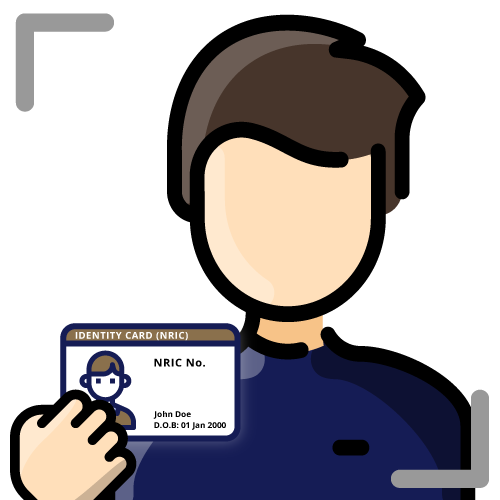
For Non-Singpass Holders (Manual ID Verification)
| Step 1 | Click on the "Verify Manually' button. |
| Step 2 | Submit the following documents:
Important Notes:
|
| Step 3 | Upon submission, SMU will verify your selfie, identity document and your uploaded photograph |
Should you have further queries or encounter issues, please screenshot the page and email to matriculation@smu.edu.sg.
Navigation Path: Self Service » Online Matriculation » ID Verification
✅ Pre-requisite Checklist
All matriculated students are required to have their identity verified before they enroll at SMU. As part of SMU's digitalization efforts, we have integrated our student information system with the Singapore government's consent-based MyInfo for Singpass users, which removes the need for the manual verification of identity documents. Non-Singpass users will need to submit their identity documents online for manual verification.
You will be required to sign in to Self Service with your SMU credentials to complete the identity verification. After your identity has been verified by SMU, you will receive an email notification at a later date informing you of the SMU Student Card Collection sessions.
| Online ID Verification | Applicable to Students |
|---|---|
| 17 June 2026, 9:00am to 9 July 2026, 5:00pm | Completed Online Matriculation between 17 June 2026 to 9 July 2026 |
| 14 July 2026, 9:00am to 23 July 2026, 5:00pm* | Completed Ad hoc Online Matriculation between 14 July 2026 to 23 July 2026 |
*Please note that students who did not complete their ID verification at least 3 working days before the SMU Student Card collection sessions will not be able to collect their student cards during the sessions. You will be informed via email to collect your student card after the SMU Student Card Collection sessions instead.
Navigation Path: My Checklists » Pre-Term Activities » ID Verification
(Do ensure pop ups are allowed in your browser settings)
For Singpass Holders (Automated ID Verification) Recommended approach
| Step 1 | Click on the “Verify with MyInfo” button. |
| Step 2 | Login to Singpass with your Singpass credential. |
| Step 3 | Click the “I Agree” button. |
| Step 4 | Click the “Confirm” button to end the process. |
For Non-Singpass Holders (Manual ID Verification)
| Step 1 | Click on the "Verify Manually' button. |
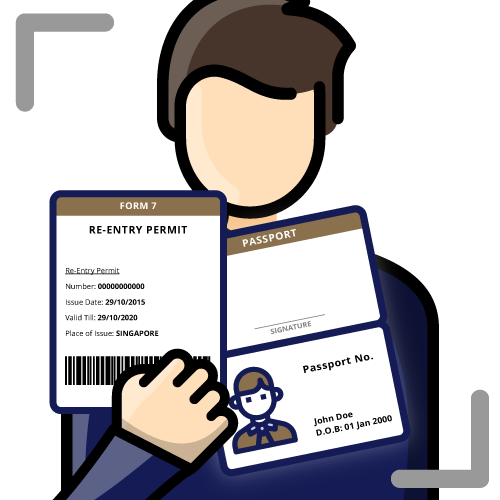
| Step 2 | Submit the following documents:
Important Notes:
|
| Step 3 | Upon submission, SMU will verify your selfie, identity documents and your uploaded photograph |
Should you have further queries or encounter issues, please screenshot the page and email to matriculation@smu.edu.sg.
Completion of Formalities
Students with Student’s pass (STP) In-Principle Approval (IPA) letter issued between 1 June to 31 July must attend the scheduled Offsite Enrolment exercise (OSE) on campus for the Completion of Formalities (COF). Please refer to the email sent by your respective SMU Graduate Programme Office to register for a time slot via the microsite for the Offsite Enrolment Exercise on campus
Offsite Enrolment Exercise (OSE) | |
|---|---|
| Date | 11 – 12 August 2026 |
| Venue | SOE/SCIS2 B1 Computing Lab (View on Campus Map) |
Identity Verification
✅ Pre-requisite Checklist
All matriculated students are required to have their identity verified before they enroll at SMU. As part of SMU's digitalization efforts, we have integrated our student information system with the Singapore government's consent-based MyInfo for Singpass users, which removes the need for the manual verification of identity documents. Non-Singpass users will need to submit their identity documents online for manual verification.
You will be required to sign in to Self Service with your SMU credentials to complete the identity verification. After your identity has been verified by SMU, you will receive an email notification at a later date informing you of the SMU Student Card Collection sessions.
Navigation Path: My Checklists » Pre-Term Activities » ID Verification
(Do ensure pop ups are allowed in your browser settings)
For Singpass Holders (Automated ID Verification) Recommended approach
| Step 1 | Click on the “Verify with MyInfo” button. |
| Step 2 | Login to Singpass with your Singpass credential. |
| Step 3 | Click the “I Agree” button. |
| Step 4 | Click the “Confirm” button to end the process. |
For Non-Singpass Holders (Manual ID Verification)
| Step 1 | Click on the "Verify Manually' button. |
| Step 2 | Submit the following documents:
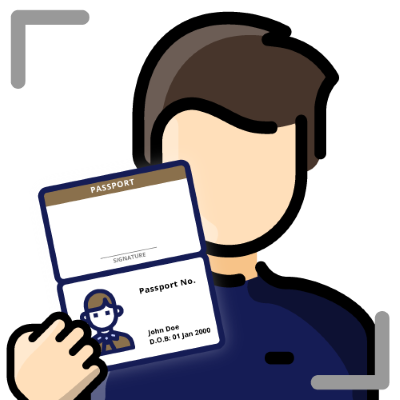 |
| Step 4 | Upon submission, SMU will verify your selfie, the documents that you have submitted during the ID verification process as well as your uploaded photograph as described under "Upload Photograph". |
Note: International students who are overseas and are unable to convert their IPA letter to the ICA student pass/MOM work pass as yet should continue with the other/remaining activities as outlined in the matriculation webpage. Students may complete this Online Identity Verification step after the issuance of their ICA Student pass. Ad hoc arrangements will be made for these students to collect their SMU student card.
Should you have further queries or encounter issues, please screenshot the page and email to matriculation@smu.edu.sg.
(This step is not applicable to IPM/IGD students.)
In line with Singapore’s continuing effort towards productivity improvement, the University is moving towards electronic payments as the principal mode of transaction between students and the University. As such, all students matriculating are required to provide their Singapore based bank account details.
International students may update their bank account details after their arrival in Singapore. You will be required to furnish details for the “Receiving Bank Account”. The “Receiving Bank Account” is the account that you would like to receive payment from the University. This could be in the form of Bursaries, Scholarships, Stipends, Expense claims and other forms of official payment.
Click here for Steps to add "Receiving Bank Account”
Should you have any questions, please submit a request at https://ofnsupport.smu.edu.sg/hc/en-us/requests/new.
For more information, please select one of the categories below:
✅ Pre-requisite Checklist:
The SMU Student Card serves as a form of student identification throughout your study at SMU. The contactless card will need to be used to access various campus buildings and facilities such as seminar rooms, classrooms, library, gymnasium, etc.
Students must collect their SMU Student Card personally as indicated below.
| Collection Date and Time | Collection Venue (Campus Map) |
| Thursday, 30 July 2026 to Friday, 31 July 2026 9:30am - 12:00pm and 1:00pm - 4:00pm | Li Ka Shing Library - The Quiet Area |
| Friday, 21 August 2026 11:30am - 2:30pm | CIS Event Lobby, B1, Yong Pung How School of Law |
Important Notes
- Only students who have completed the pre-requisites will receive an email from SMU regarding their SMU Student Card collection 3 to 7 working days before the collection date.
- You will need to present the email with QR code when collecting your SMU Student Card. Instructions on how to configure your SMU Email on your mobile device will be sent to you before the collection.
- Student Card can only be collected personally by the student. Collection via proxy (such as friend, representative or family members) is not allowed.
- Pending the collection of their SMU Student Card, students should still proceed with the other/remaining activities (e.g. register for classes), which are not contingent on the card collection.
✅ Pre-requisite Checklist:
The SMU Student Card serves as a form of student identification throughout your study at SMU. The contactless card will need to be used to access various campus buildings and facilities such as seminar rooms, classrooms, library, gymnasium, etc.
Students must collect their SMU Student Card personally as indicated below.
| Collection Date and Time | Collection Venue (Campus Map) |
| Thursday, 30 July 2026 to Friday, 31 July 2026 9:30am - 12:00pm and 1:00pm - 4:00pm | Li Ka Shing Library - The Quiet Area |
| Friday, 21 August 2026 11:30am - 2:30pm | CIS Event Lobby, B1, Yong Pung How School of Law |
Important Notes
- Only students who have completed the pre-requisites will receive an email from SMU regarding their SMU Student Card collection 3 to 7 working days before the collection date.
- You will need to present the email with QR code when collecting your SMU Student Card. Instructions on how to configure your SMU Email on your mobile device will be sent to you before the collection.
- Student Card can only be collected personally by the student. Collection via proxy (such as friend, representative or family members) is not allowed.
- Pending the collection of their SMU Student Card, students should still proceed with the other/remaining activities (e.g. register for classes), which are not contingent on the card collection.
✅ Pre-requisite Checklist:
The SMU Student Card serves as a form of student identification throughout your study at SMU. The contactless card will need to be used to access various campus buildings and facilities such as seminar rooms, classrooms, library, gymnasium, etc.
| Collection Date/Time and Venue | Applicable for International students who |
| Thursday, 30 July 2026 to Friday, 31 July 2026 9:30am - 12:00pm and 1:00pm - 4:00pm Li Ka Shing Library - The Quiet Area | Have received their ICA Student's Pass and completed ID verification |
Friday, 21 August 2026 | Have received their ICA Student's Pass and completed ID verification |
Important Notes
- Only students who have completed the pre-requisites will receive an email from SMU regarding their SMU Student Card collection 3 to 7 working days before the collection date.
- You will need to present the email with QR code when collecting your SMU Student Card. Instructions on how to configure your SMU Email on your mobile device will be sent to you before the collection.
- Student Card can only be collected personally by the student. Collection via proxy (such as friend, representative or family members) is not allowed.
- Pending the collection of their SMU Student Card, students should still proceed with the other/remaining activities (e.g. register for classes), which are not contingent on the card collection.